Stop letting browser tabs steal your focus.
If you use Jira every day, you already know the feeling. You open a new tab to check a ticket. Five minutes later you’re reading an article, skimming a notification, or stuck in a rabbit hole you didn’t plan for. The work you opened Jira for? Still waiting.
This is the problem JDU — Jira Desktop Unofficial was built to solve.
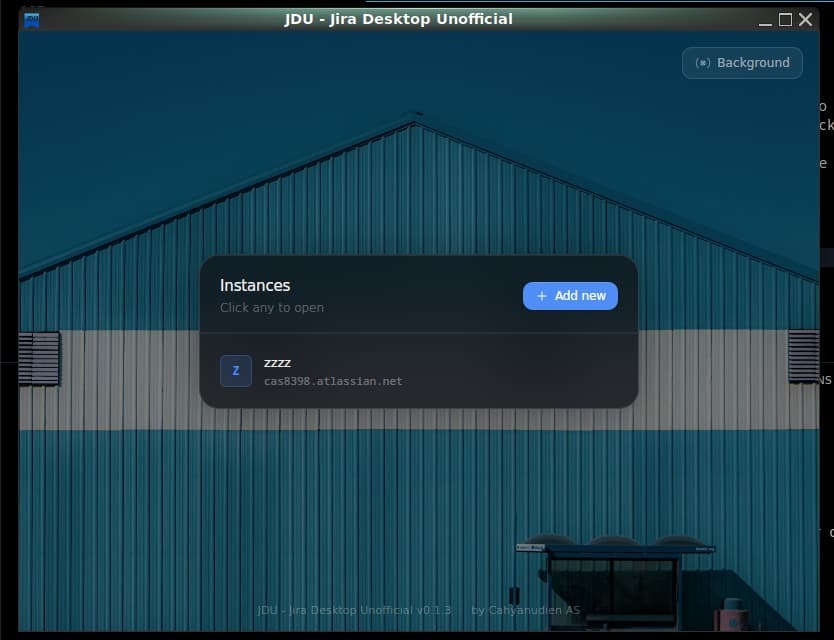
JDU (short for Jira Desktop Unofficial) is a minimal, focused desktop wrapper for Jira — built with Tauri and Rust. It gives Jira its own dedicated window, completely separate from your browser. No tabs. No distractions. Just your work.
💡 JDU = Jira Desktop Unofficial (JDU) — A Minimal Jira Desktop Wrapper Built with Tauri.
That’s the full name. You’ll see it everywhere: in the app, in the releases, and in the community.
🔗 Quick Links
| 📥 Download | github.com/cas8398/jira-desktop-unofficial/releases |
| ⭐ GitHub | github.com/cas8398/jira-desktop-unofficial |
| 🌐 Project Page | cas8398.github.io/jira-desktop-unofficial |
| 📖 Medium | Read the original story |
🖥️ What Is JDU?
JDU — Jira Desktop Unofficial is a desktop application that wraps your Jira instance in a clean, native window. It doesn’t add new features to Jira itself — it changes how you access it.
Instead of opening Jira inside a browser tab surrounded by noise, JDU gives it its own space. You launch it like you launch Slack or VS Code. It opens directly into Jira. You work. You close it. That’s it.
Under the hood, JDU uses Tauri — a modern framework that combines a Rust backend with your operating system’s native webview. This means no Chromium bundled inside, no Node.js bloat, and no 300MB memory drain before you’ve even logged in.
It supports any Jira instance: Jira Cloud, Jira Server, and Jira Data Center. On first launch, you paste in your URL. JDU remembers it. Every launch after that goes straight to your board.
✨ Features
🖥️ Dedicated Window
Jira gets its own window — completely isolated from your browser. Alt-Tab to JDU the same way you’d switch to Slack or your terminal. Your other tabs stay clean.
⚡ Ultra-Lightweight
JDU uses ~80MB of RAM at runtime and downloads at under 8MB. It starts in under 2 seconds. Compare that to a typical Electron app at 350MB RAM and 120MB to download.
🔒 Privacy-First
Zero tracking. Zero telemetry. Zero data collection of any kind. Your Jira credentials are handled entirely by Jira’s own login system — exactly as in a browser. JDU has no backend servers and sends nothing anywhere. The full source code is on GitHub.
🌐 Works With Any Jira
- ✅ Jira Cloud (
*.atlassian.net) - ✅ Jira Server (self-hosted)
- ✅ Jira Data Center
🧠 Smart Memory
JDU remembers your Jira URL and window size/position across sessions. Open the app, get straight to your board — no setup, no re-entering URLs.
🎨 Custom Backgrounds & Overlay
Starting in v0.1.3, you can personalize the JDU window with 5 curated background images and fine-tune overlay opacity (0–100%) to match your taste.
🔄 Dynamic Window Titles
The window title updates as you navigate between Jira pages — so if you use your taskbar or window switcher, you always know exactly where you are.
📱 Cross-Platform
JDU runs natively on Windows, macOS, and Linux. Same experience, same performance, everywhere.
🧩 Why Not Electron? (And Why This Matters for Jira Users)
This is the question most developers ask first — and it’s a fair one. Almost every “desktop wrapper” app you’ve used was built with Electron. There’s a reason JDU is different.
The Electron problem
Electron works by bundling an entire copy of Chromium — Google Chrome’s rendering engine — into every app. Every. Single. App. That means:
- Your Jira wrapper carries ~120MB of download just to boot
- It consumes 300–500MB of RAM before you’ve opened a single ticket
- Startup takes 5–8 seconds
- Background CPU usage stays elevated even when idle
If you have multiple Electron apps running (Slack, VS Code, Notion, etc.), the cumulative memory cost becomes significant. Adding a Jira Electron wrapper on top of that is just more tax.
The Tauri approach
Tauri doesn’t bundle Chromium. Instead, it uses the webview already built into your OS:
- WebView2 on Windows (powered by Edge)
- WebKit on macOS and Linux
The rendering quality is identical. The resource cost is a fraction. And because the backend is written in Rust — a memory-safe, compiled systems language — the app is secure and fast by design.
For Jira users specifically, this matters because JDU is likely running all day. A tool you keep open for 8 hours should not be quietly draining your battery and RAM for 8 hours.
📈 Performance at a Glance
| Metric | JDU | Typical Electron App | Browser Tab |
|---|---|---|---|
| Memory Usage | ~80 MB | ~350 MB | ~150 MB |
| Startup Time | < 2 seconds | 5–8 seconds | Instant |
| Download Size | ~8 MB | ~120 MB | N/A |
| Background CPU | Minimal | Moderate | High (with other tabs) |
| Tracking / Telemetry | None | Varies | Browser-level |
🚀 Getting Started in 60 Seconds
Step 1 — Download
Head to the GitHub releases page and grab the installer for your OS.
Step 2 — Install
🪟 Windows
Run the .msi or .exe installer. JDU requires Microsoft Edge WebView2 — most Windows 10/11 machines already have it. If not, download it here.
🍎 macOS
Open the .dmg file and drag JDU to your Applications folder.
🐧 Linux
Available as .AppImage, .deb, or .rpm. Download the format that fits your distro.
🔧 Build from Source
git clone https://github.com/cas8398/jira-desktop-unofficial
cd jira-desktop-unofficial
pnpm install
pnpm tauri build
Requires Rust, Node.js, and the Tauri prerequisites for your platform.
Step 3 — Launch
Open JDU, paste your Jira instance URL (e.g. https://yourcompany.atlassian.net), press Enter — and you’re in. JDU remembers the URL from now on.
🔍 Deep Dive: JDU for Power Jira Users
If you live in Jira — sprints, backlogs, board views, Confluence-linked tickets, JQL filters — here’s what JDU specifically does and doesn’t change for you.
What stays the same
Everything Jira does in the browser works identically in JDU. JDU is a wrapper — it renders the real Jira web interface inside a native window. Your keyboard shortcuts, your saved filters, your board layouts, your integrations — all untouched.
What gets better
- Focus: No browser tabs means no accidental navigation away from Jira mid-task.
- Switching: JDU appears in your taskbar/dock like any native app. Alt-Tab to it in one move.
- Window memory: JDU remembers where you left the window and how big it was. Reopen it, it’s right where you left it.
- Background behavior: JDU uses minimal CPU when it’s not in focus, unlike a browser tab that may keep running scripts actively.
- Custom aesthetic: With v0.1.3, you can now set a background image and control overlay opacity — making your Jira window feel more personal.
What’s still on the roadmap
- Desktop push notifications for Jira updates
- Keyboard shortcut layer for quick actions
- Dark mode and custom theme support
- Multi-account / multi-instance support
- Offline connection status indicators
🔖 What’s New in v0.1.3
The latest release brings meaningful visual and UX improvements:
- Custom Backgrounds — 5 curated Pexels images to personalize your workspace
- Dynamic Window Titles — The title bar updates as you move between Jira pages
- Modern UI Redesign — Cleaner interface throughout the app
- Better URL Validation — Handles trailing slashes and edge-case URLs correctly
- Smarter Domain Detection — More reliable Cloud vs. Server instance detection
- Overlay Opacity Control — Slider from 0 to 100% to control background darkness
- Bug Fix — URL validation issue (#2) resolved
Special thanks to @Tsenzuk, @bupemko, @pdkrg, and @mitrapartha for reporting and helping fix the URL validation bug.
🎯 Who Should Use JDU?
JDU is for you if:
- You’re a developer, tech lead, or engineering manager who navigates Jira daily
- You’re a project manager or Scrum Master who lives on the board and backlog views
- You care about lightweight, efficient tooling and hate RAM-hungry Electron apps
- You want a distraction-free workflow and browser tab chaos is real for you
- You value open-source, auditable software with no hidden data collection
JDU is probably not for you if you primarily use Jira occasionally and don’t mind the browser tab experience.
🤝 Contributing & Community
JDU is fully open source under the MIT license and welcomes contributions of all kinds.
- Bug reports → GitHub Issues — include your OS, app version, and steps to reproduce
- Feature requests → GitHub Discussions
- Pull requests → Fork the repo, make your change, open a PR
- Give it a star → Helps the project get discovered by others who’d benefit from it
📥 Download JDU Now
Free. Open source. Under 8MB. No Electron. No bloat.
➡️ Download JDU — Jira Desktop Unofficial
🛑 Disclaimer: JDU is an independent, community-built project and is not affiliated with or endorsed by Atlassian. Jira is a registered trademark of Atlassian Corporation Plc. JDU is a desktop wrapper around the official Jira web interface.
Built with ❤️ by cas8398 using Tauri — MIT License
